
Track Every Gallon. Account for Every Dollar.
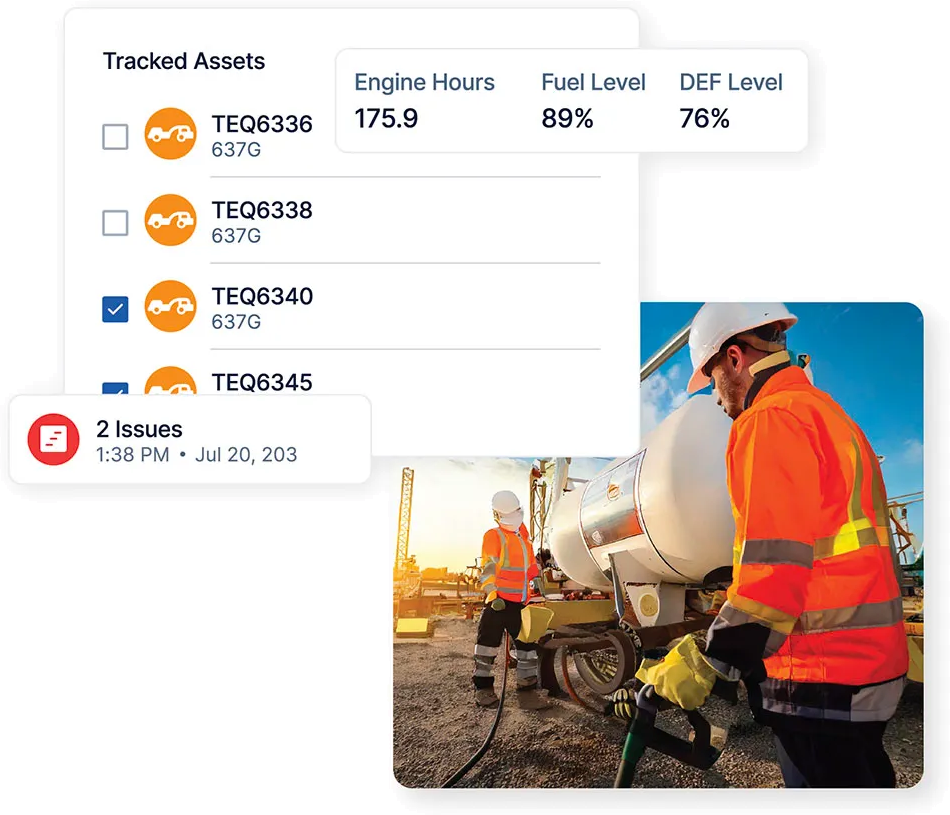
Fuel is one of the largest variable costs in a construction fleet. Clue's fleet fueling management software lets fuelers log every fill in the mobile app. Managers see fuel use per asset, idle time, and fuel spend by project.







Fuel management
Fleet fueling for construction. From fill to fuel spend.

Digital Fuel Logs, Right from Your Phone
Fuelers use the fueler app to find equipment by name or number, on a nearby map, or with a QR code. They pick a fuel truck or tank, enter gallons, and submit the entry to the web dashboard.
Asset Search: Find the equipment by name or number before recording the fill
Nearby Map: Select equipment near your location from the mobile screen
QR Code Scan: Open the right equipment record with the camera
Fill Details: Record gallons, fuel source, project, date, and engine hours
Submission Status: Confirm the asset, submitter, source, project, and synced time
Consumption Tracking Per Asset
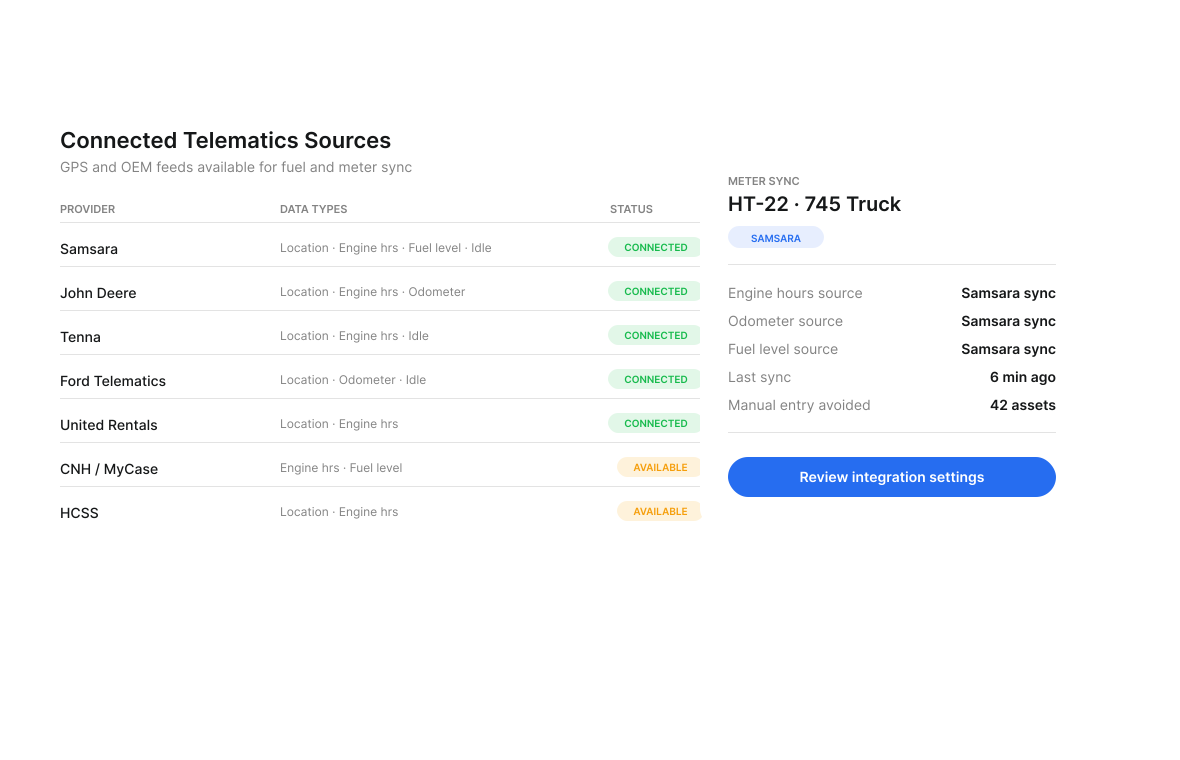
Construction fuel tracking software shows fuel use per asset for any date range. Managers compare gallons with hours worked. High fuel burn can point to a maintenance need or operator habits.
Connected Meter Data: Bring engine hours, fuel level, location, and idle time into Clue
Usage By Asset: Compare gallons burned with hours worked across any date range
Efficiency View: See daily average, monthly total, gallons per hour, and utilization
Source Status: Check each meter feed and its last sync time
See Idle Time and Cost
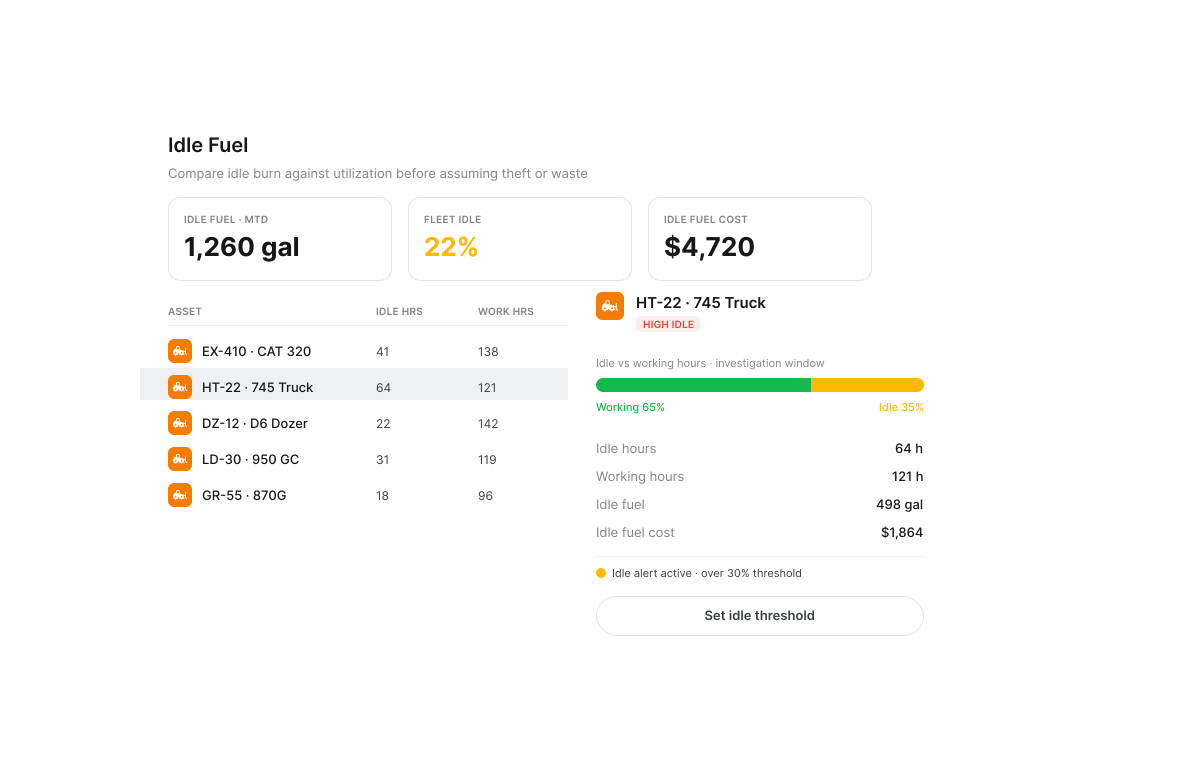
Clue uses telematics to show idle hours, idle rate and how much fuel each asset burns while idling. It shows the dollar cost for idle time above each asset's set threshold.
Idle Fuel: See how much fuel each asset burns while idling
Idle Cost: See the dollar cost for idle time above each asset's threshold
Idle Rate: See idle hours, operating hours, working hours and idle rate by asset
Idle Threshold: Set an idle threshold and cost per hour for each asset
Idle Flags: Review high idle flags in the report and scheduled report emails
Track Fuel from Source to Equipment
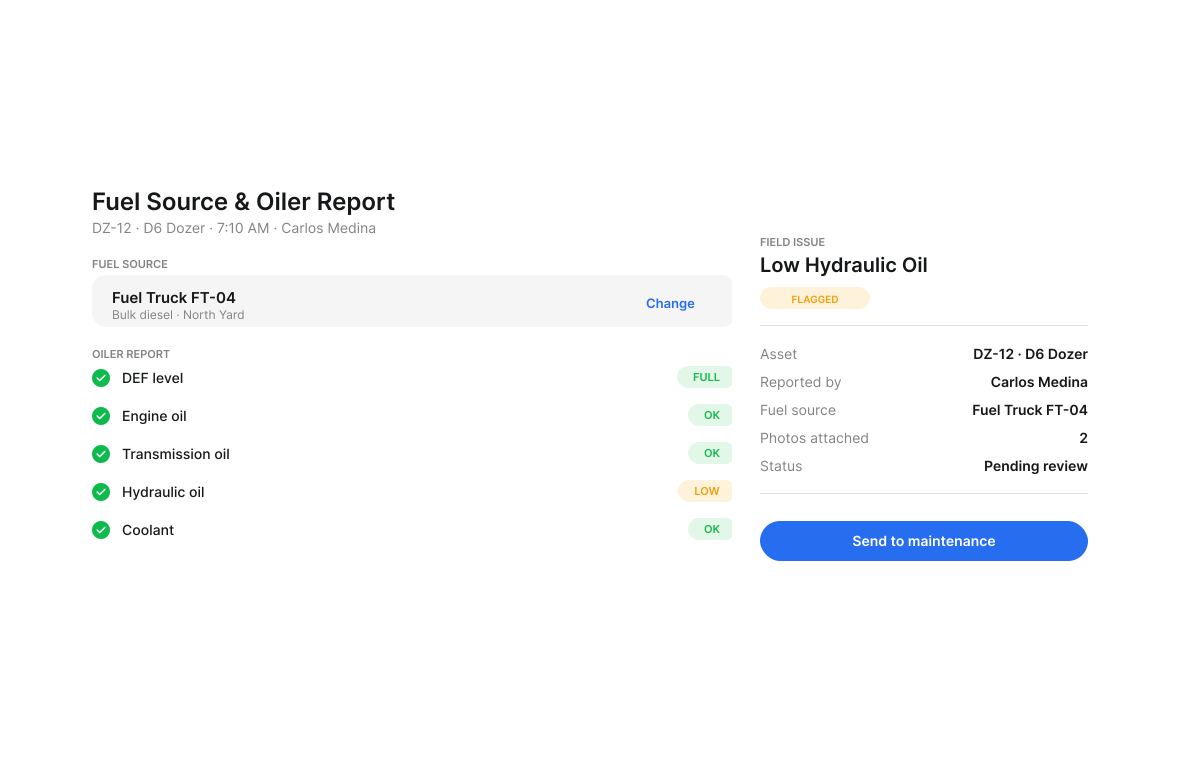
Each fill records its fuel source and the equipment that received the fuel. Fuel Flow shows purchased, delivered and dispensed gallons side by side for the chosen period.
Fuel Source Record: Capture which fuel truck or yard tank supplied each fill
Transaction Path: See the fuel source and equipment for every transaction
Flow Type: See Purchase, Delivery, Dispense or Unattributed on each transaction
Period Totals: Compare gallons purchased, delivered and dispensed for the chosen period
Fuel Route: Plan the next service run around equipment with the lowest fuel levels
Fuel Spend Reporting by Project and Division
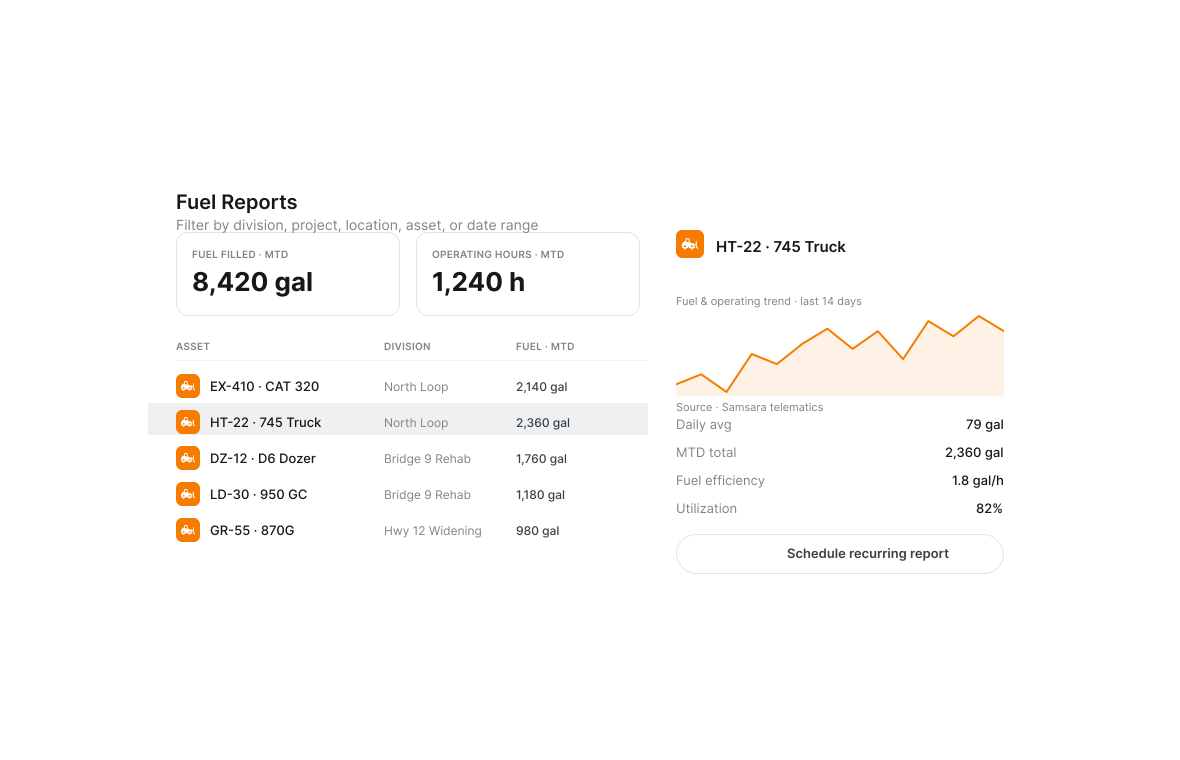
Break down fuel costs by project, asset class, or division. Give project managers visibility into their fuel spend and give leadership the data to set fuel budgets with confidence.
Project Filters: Break down transactions by job, division, location, asset, or date
Spend Allocation: Assign each fill to the job selected on the mobile form
Asset Class View: Compare fuel use across equipment groups and operating periods
Recurring Reports: Schedule a regular view of fuel use for team review

Review Fuel Use by Asset
Compare fuel used, fuel filled and fuel per operating hour across assets and date ranges. Each fill shows the asset, person, fuel source, project, date and engine hours.
Fuel Used: Compare fuel use by asset and date range
Fuel Filled: Review fuel filled for each asset
Fuel Efficiency: Compare fuel per operating hour across assets
Fill Details: Review the asset, person, fuel source, project, date and engine hours
Built for every role
Solutions for every team.
Field, shop, and office teams use the same system. Equipment managers, fleet managers, operations leaders, CFOs, and executives see equipment details for their work.

Equipment Manager
“It's a single pane of glass where you see everything across your fleet, from the field to the phone to the computer.”
Abe Sharaf
Equipment Manager, Pulice Construction
Read Pulice’s story

Fleet Manager
“Imagine receiving 2,000 spreadsheets that needed to be approved individually in an email. There were entire teams dedicated to that. Now the system is fully automated, completely automated from beginning to end.”
Julio Lopez
Fleet Manager, Fort McKay Group
Read Fort McKay’s story

CFO
“You went from doing two services a day to six services a day. That right there is priceless to me.”
Darrin Sheriff
Director of Maintenance & Purchasing, Palmetto Corp
Read Palmetto’s story

VP of Operations
“The big thing with Clue is that we're able to bridge the gap between our field, our operators in our shop, and other departments. Everybody's bought into Clue now.”
Eric Sellman
COO, Brent Scarbrough & Co
Read Brent Scarbrough’s story

Executive
“We had 20 different logins between all our different softwares and web platforms. Now all that information pulls into one spot and we're able to see it in a single place.”
John Igel
CEO, George Igel Co.
Read Igel’s story

Operations Manager
“The operator's in control of his own destiny. That was a huge reason why not only did I buy into it, but I'm also investing into it for the future.”
Ben Benoit
Operations Manager, Onshore Companies
Read Onshore’s story
Across every fuel day
Why Construction Fuelers Choose Clue
Fast mobile fills. Fuel use by asset. Idle cost. Fuel flow. Fill reviews. Project spend.
Fast Mobile Logging
Log fills in seconds from your phone. Equipment ID lookup, gallons, and meter reading, done before you move to the next piece of equipment.
Automatic Consumption Analysis
Clue uses fuel entries and engine hours to show gallons per hour for each asset, plus a daily average and monthly total.
Idle Time Cost in Dollars
Set an idle cost per hour for each asset. See the dollar cost for idle time above its threshold.
Fuel Flow Totals
Compare purchased, delivered and dispensed gallons side by side for the chosen period.
Fuel Use Review
Compare fuel used, fuel filled and fuel per operating hour by asset. Review the details for each fill.
Project-Level Visibility
The fueler picks a project on the fuel report. Clue ties the fill to that job. Managers review fuel spend by project, division, asset, and date.
Equipment Data Feeds the Fuel Record.
John Deere and Ford equipment systems, GPS trackers, and rental providers can send location, engine hours, fuel level, and idle data to Clue. Business systems add project and division details to each fuel record for reports and review.
















.png)








From the people who use it every day
What contractors say
“Clue’s real-time data capability has completely changed the way we manage our assets.”
Darrin Sheriff, Director of Maintenance and Purchasing
“The big thing with Clue is that we’re able to bridge the gap between our field, our operators in our shop, and other departments.”
Brent Scarbrough & Company
“There were entire teams dedicated to approving spreadsheets one by one.”
Fort McKay First Nation
“The biggest difference has been the user friendliness.”
William A. Hazel
“It exposes dead cost or overhead that maybe we don’t know about because it gets lost in those three different systems.”
Moss Utilities
“It was probably taking the better part of a day to combine all the data from the telematics.”
Derek Wolfe, Equipment Manager, George Igel Co.
“Clue allows us to effectively control our operations: financially, effectively and safely.”
Joseph Yammine, Project Manager, Graham
“QR codes have been a game changer for us with regards to operator inspections.”
Ben Benoit, Operations Manager
“It’s a single pane of glass where you see everything across your fleet, from the field to the phone to the computer.”
Abe Sharaf, Corporate Equipment Engineer
“Our field guys were tired of having a new product, a new something to learn each time.”
Rob Judge, Sr. Procurement & Program Manager
“Our equipment is in far better shape since we started using Clue, for sure.”
Jake Farley, Equipment Manager, Silver Star Construction















Asset Directory in Clue: Saved Views, Bulk Edits & Meters
Parts Management in Clue: Requests, Delivery Tracking & Inventory
Template Manager in Clue: Inspection Templates, AI Import & Shared Categories
Preventive Maintenance in Clue: Build a PM Plan, Automate Work Orders
Work Orders in Clue: Repair History, Parts, and Labor Costs
Common questions
Fleet fueling management software FAQ.
What is fleet fueling management software?
Fleet fueling management software keeps every fill, meter reading, idle cost, tank level, and project charge for construction equipment in one record. Clue links mobile fuel reports with connected telematics data, so fuelers record the work in the field and managers review use, cost, and trends.
How do fuelers log fuel transactions in Clue?
Fuelers use the Clue mobile app to log each fill, selecting the equipment, entering gallons dispensed and current meter reading. GPS captures the location automatically.
Does Clue track fuel from bulk storage?
Yes. Each fill records the fuel truck or yard tank that supplied the fuel. Fuel Flow shows purchased, delivered and dispensed gallons side by side.
How does Clue show fuel use for each asset?
The Fuel and Fluids report shows Fuel Used, Fuel Filled, Fuel Efficiency, Fuel in Idle, Idle Hours and Idle Rate for each asset.
How can managers review unusual fuel use?
Managers compare fuel used, fuel filled and fuel per operating hour for each asset. Each fill shows the asset, person, fuel source, project, date and engine hours. Fuel Flow labels each transaction as Purchase, Delivery, Dispense or Unattributed.
Does Clue integrate with fuel management systems?
Yes. Clue integrates with major fleet fuel management and telematics systems. Contact our team for a current list of supported integrations.
How does fuel data sync from telematics?
Fuel data syncs into Clue from connected equipment systems. Sources can send location, engine hours, fuel level, and idle time for each asset. Clue shows the source and the last sync time, so teams can see where each reading came from.
How do meter readings reach the fuel record?
Meter readings reach the fuel record through connected equipment sources and through the mobile fuel report. Clue shows the source for engine hours, odometer, and fuel level, plus the last sync time. Each submitted fill can carry engine hours into the saved record.
How does fuel cost get assigned to a project?
Fuel cost reaches a project when the fueler selects that project on the fuel report. Clue ties the fill to the chosen job, then groups transactions for project and division reporting. Managers can review spend by date, asset, location, or team.
Can fuel reports be scheduled?
Yes. Managers filter a fuel report and export it or schedule it by email. A daily, weekly, or monthly schedule sends any report to any email address. Each scheduled email gives operations, finance, and project teams the same view.
How does Clue separate idle fuel from working fuel?
Clue separates idle fuel from working fuel using connected idle time and operating hours. The asset view shows working time, idle time, idle percentage, and the fuel burned while sitting. Managers can review the same figures by asset or across the fleet.
What does an oiler report cover?
An oiler report adds fluid checks to a fuel report. It covers DEF, engine oil, transmission oil, hydraulic oil, and coolant. The fueler records gallons, marks each item pass or fail, enters any amount added, and records the fuel source. Teams can set the checklist for each equipment type.
How does a low fluid reading reach maintenance?
The fueler turns a low fluid reading into a field issue on the asset record. The fueler adds a description, picks a severity, and attaches photos. The shop reviews the issue and can turn it into a work order.
What should teams look for in fleet fueling management software?
Teams should look for one record that connects field fills, equipment data, fuel sources, idle cost and project spend. It should show each data source and its last sync time. Clear reports should arrive by email on a set schedule.
See Clue pricingWho uses each part of Clue's fuel tools?
Fuelers use the mobile fuel report form, equipment fuel level view, route list and oiler checklist. Fuel managers review fuel use by asset, idle cost, fuel flow and reports. Project managers track fuel spend by job. Leaders use the same record to set fuel budgets.
How does a fueler choose the right equipment and fuel source?
The fuel log app lets fuelers choose the equipment and fuel source for each fill. They search by name or number, view nearby equipment on a map, or scan a QR code. They pick a fuel truck or tank and enter the gallons. The form shows the serial number, engine hours, miles, date, and project.
How do fuelers choose the next equipment to fuel?
Fleet fueling software shows each asset's current fuel percentage in the mobile app's Fuel Tank Level filter. Fuelers start with the lowest levels and plan their route around them. Dispatchers check fuel levels when they assign equipment to jobs. Supervisors see low-fuel equipment in the field.
Do fuelers get their own login and view in Clue?
Yes, Clue gives each fueler a login and a Fueler view. Each role shows the tools that person needs. The fueler app gives field teams the fuel report form, tank view, route list, and oiler checklist for work in the field.
What does the fuel report show managers?
Fuel tracking software shows managers fuel filled, fuel used, fuel efficiency, operating hours, working hours, idle hours, idle rate, CO2 emissions, and utilization rate. Managers filter the report by division, project, location, asset, or date range. They can export the view or schedule it by email.